
Split-screen mode for second map
Right now the Second Map is an overlay on top of the main map. On smaller screens it covers a big part of the main map, and the position indicator can end up nearly hidden behind it. The indicator also isn’t centered in the visible part of the main map, because the main map still uses the full screen width.
Proposal
Add an option to dock the Second Map side by side with the main map instead of overlaying it. Each map gets its own pane, and each map centers the position indicator in its own pane.
Layout options
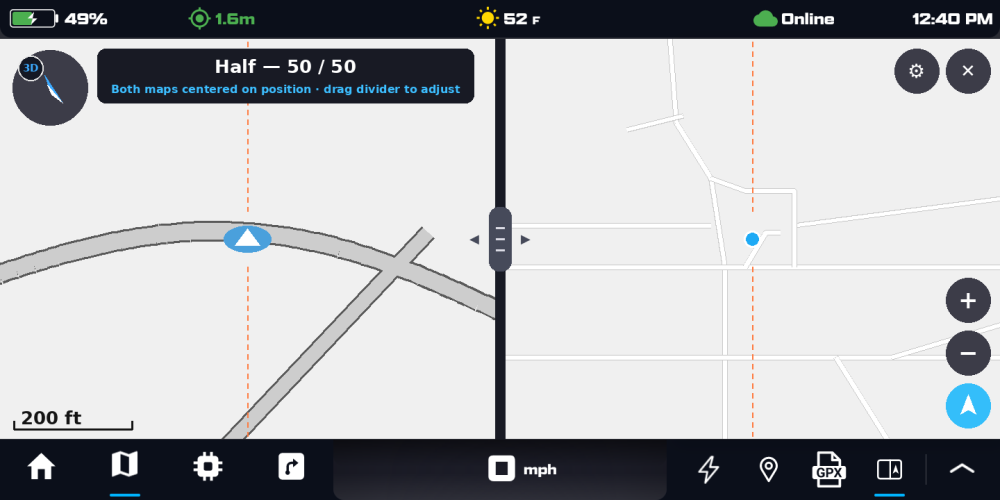
Half (50/50): The two maps are the same width.
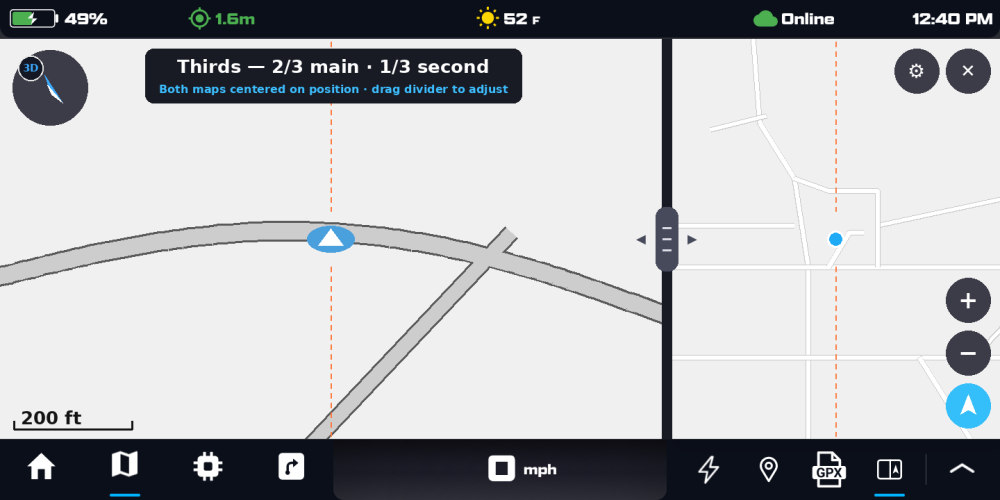
Thirds (2/3 + 1/3): The main map takes 2/3 of the screen and the Second Map takes 1/3. The Second Map can go on the left or the right.
Custom: A divider you can drag left or right to set any split.
A draggable divider could replace the Half and Thirds presets entirely. It could also snap to 50/50 and 2/3 so those layouts are easy to hit.
Expected behavior
The maps don’t overlap.
The position indicator stays centered in both maps.
Each map keeps its own controls (zoom, recenter, settings, close).
The current overlay mode stays available for people who prefer it.
Mockups attached: Half 50/50 and Thirds with the Second Map on the right.
New feature looks good, thanks!