
WPN pinpoint black
Submitted by Roald • #775 • Nov 12, 2026 • updated 6h ago
edit roadbook row>tulips
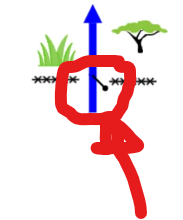
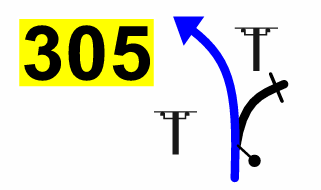
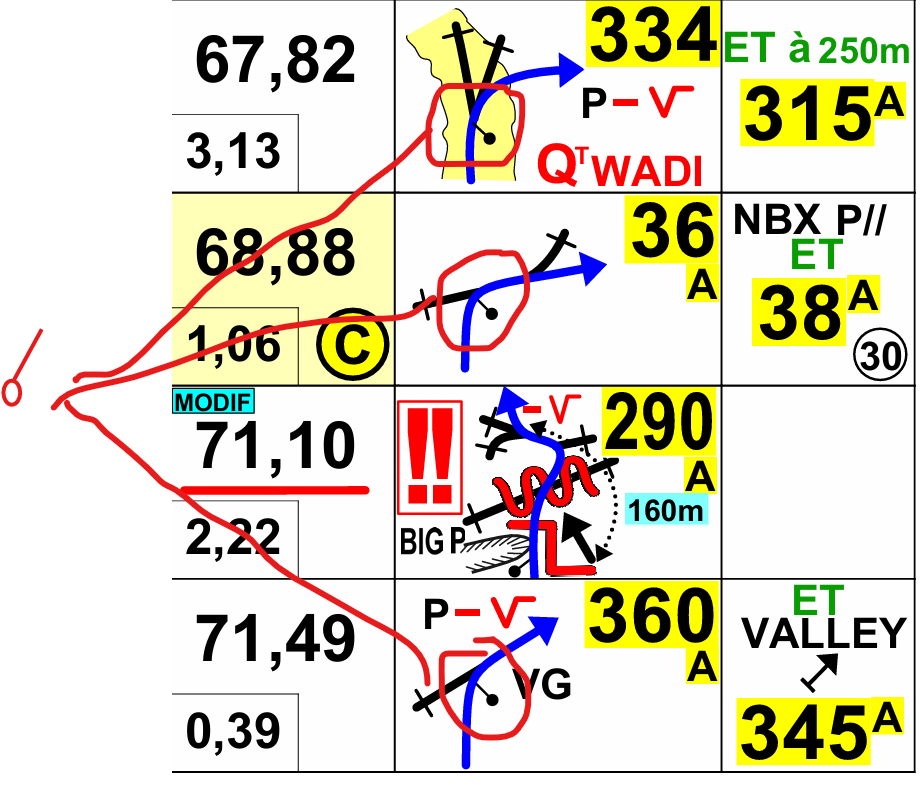
to have a black pinpoint, added to each blue line in a tulip, to mark where the WPN is pinned.
to have this pinpoint with the needle end "snap" to the blue line,
and then be able by mouse click select to drag the black pinpoint symbol where it needs to sit on the blue line
Discussion (7)
1
Vote
for the last weeks, i got it done this way,. made a pinpoint tulip which i can drag and drop where i want.
but would be handy if it was a automated feature
not only WPN but just all WP (waypoints) should be marked like this on the tulips
was this feature already released?
i can not find it under "tulips"
most tulip blue lines already start with a black dot,. just add a tail to it, and make it possible to drag it along the blue line
Hi Roald, thanks for the idea, it's live now. It isn't under Tulips: open a row in the editor and drag the black dot at the start of the blue route line along the line. It turns into the WPN pin, with its needle on the line. You can also select any line and press WPN in the tools above the tulip (or right-click the line, WPN pin on / off). Turn the pin off and the dot goes back to the start.
thanks,. for the fast reply (as usual) i will give it a try now, on my frequently used roadbook
i tried the little teardrop,.. but it is hard to spot,. could you add a tail to it ?
so that you could drag the dot away from the blue line ,and then it turns into a pin (dot with a tail).