
#11 roadmap REDUX
Submitted by iwillgosecond • #724 • Nov 4, 2026 • updated 10h ago
#11 is noted as shipped but it does not work.
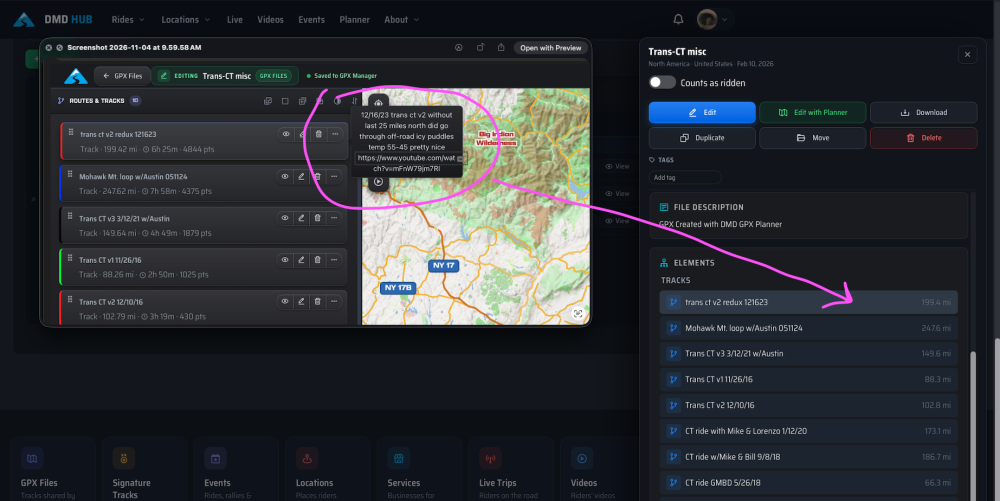
In gpx manager I often am digging around in different gpx files looking at tracks trying to find info but I can't see it anywhere in gpx manager...I have to load it in to planner then I can hover over the segment and see the description.
Please give this same access to the description text on hover inside gpx manager so I don't have to go the extra step to load it in planner just to view that.
please make hover over tracks in gpx manager show same info as hovering over tracks in planner. This is not info about the gpx. It is info about the track.
Discussion (3)
0
Vote
I just noticed #79 was the same request and also noted as released.
noted for the 3rd time as released but does not work???
Thanks for checking again, and sorry this has gone round three times. Here is where to find it:
We also found why it looked broken inside a file: when several tracks in a file run over the same roads, the pointer only picked up the track drawn on top, often one without a description, and nothing showed which line you were on. That is fixed now (live today): the track you point at is highlighted, the card names the other tracks at that spot ("Also here"), and a click lists all of them, each with its own description.
If you still see no description somewhere, tell us which file and track you pointed at and what the card showed (a screenshot helps).