
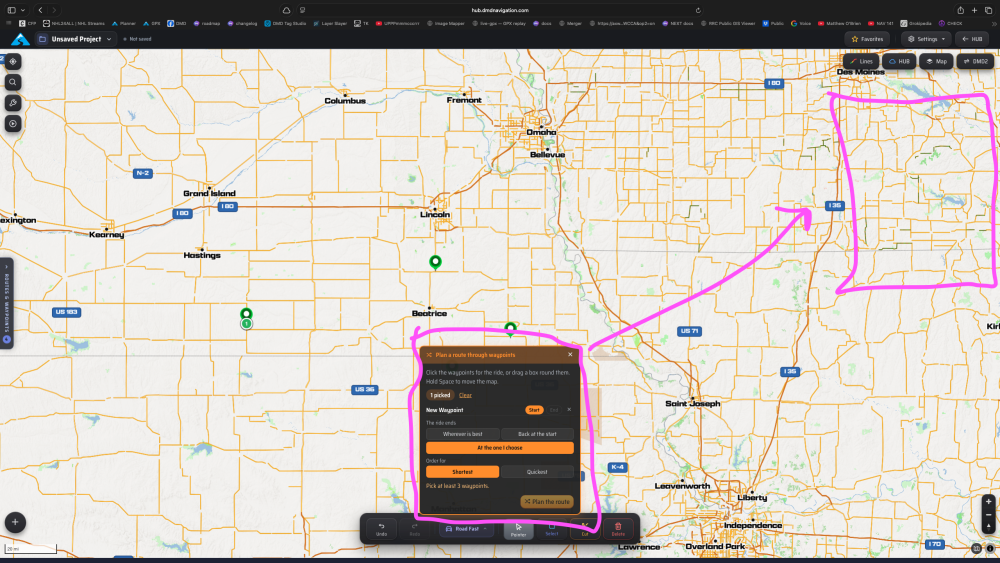
plan a route menu box
Submitted by iwillgosecond • #715 • Nov 3, 2026 • updated 10h ago
please make the plan a route menu come up in the upper right and be moveable. right now is comes up right where you are working and is not moveable.
Discussion (1)
0
Vote
Thanks for the suggestion! The Planner has changed a lot since you wrote this: its panels now open in the left menu column beside the map instead of floating over it. "Plan a route through waypoints" (and Optimize order for an existing route) now opens there too, so it no longer covers the map where you click the waypoints, and the whole map stays free for picking them or dragging a box round them. Close it with its X or Esc and the column shows what it had before. It is live on the HUB Planner now; reload the page if it still opens over the map.