
Snap imported routes to nearby roads and trails
Hi DMD Team,
I'd like to suggest an improvement to the HUB Planner regarding routes downloaded or imported from other users.
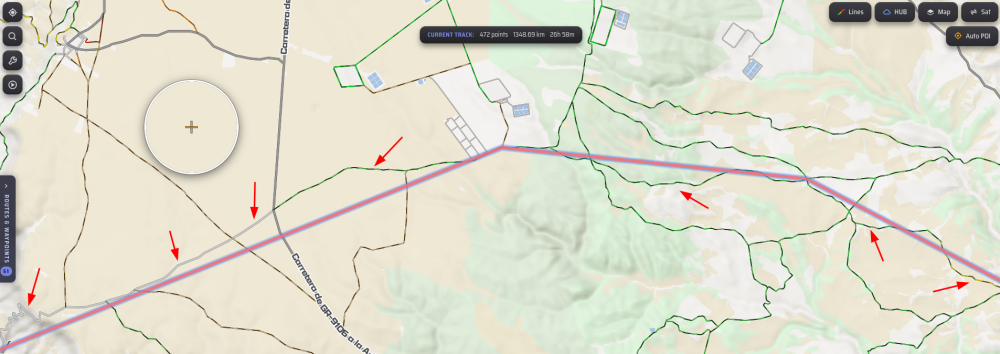
When a route contains only a few track points, the lines connecting them often don't follow the actual roads or trails shown on the map.
As you can see in the attached screenshot, the general direction of the route is understandable, but the track doesn't align with the existing roads or trails. This makes navigation less intuitive, as you constantly have to check the map to figure out which trail you're supposed to follow.
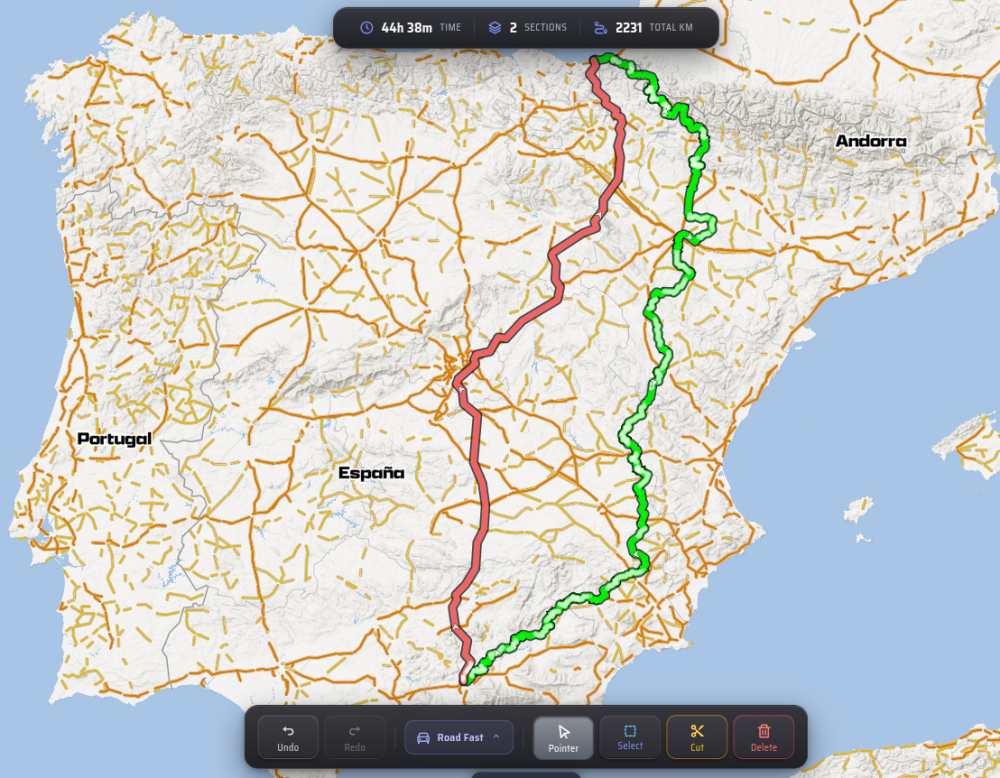
Now if you select the track and Recalculate based on the road match (for example) it recalculates all the route and it doesn't match the near route/trail (in the second screenshoot, the green track is the original and the red one is the recalculated based on the match road).
Ideally, this could work on individual segments or selected sections of the route, rather than recalculating the entire route.
For example:
- Select a section of an imported route.
- Automatically snap that section to the nearest matching roads or trails.
- Manually adjust the result if needed (in an easy way).
- Keep the rest of the route completely unchanged.
This would be particularly useful for off-road and adventure motorcycle routes, where automatically recalculating the entire route could completely change the original intended path.
I'm not sure what the best implementation would be (segment-based, section-based, or something else), but the main idea is to make it easy to correct imported routes without having to manually recreate them point by point.
Thanks.
No comments yet — be the first to chime in.