
Map downloads won’t update after app update
I just updated from old version (before the UI changed) to the current version in play store.
It asked me to import all my data.
I chose yes.
No maps were showing to be downloaded so i downloaded Colorado, Utah, Oklahoma.
Colorado failed to download for a while. Not the point.
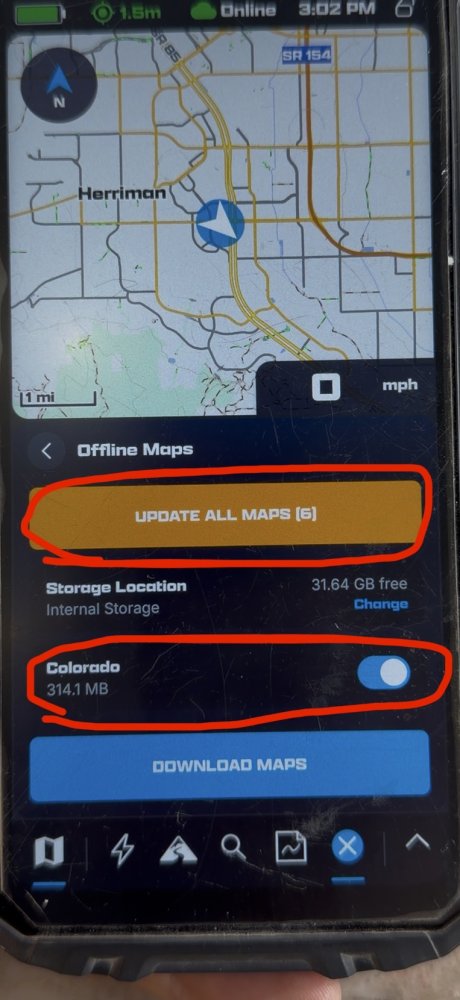
After the other states downloaded, an orange “Update all maps (6)” button appeared on the maps page.
It takes up so much space.
I pressed the button a dozen times. Nothing happens. No download. No fail message. Nothing.
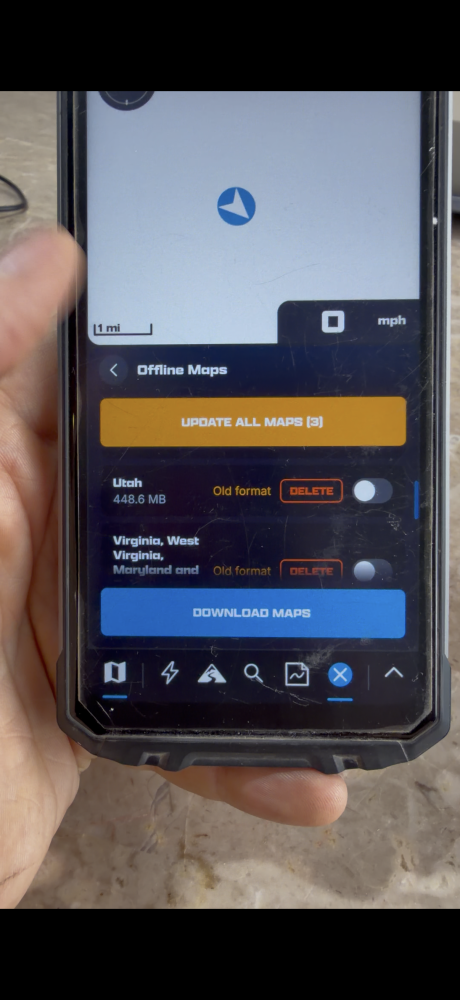
I closed out the app and reopen it and now all of a sudden a new thing is displayed. The maps i just downloaded and some others all say “Old Format”
Some that are not displayed also show [Delete] next to Old Format.
So before restarting all the maps i downloaded looked normal without “Old Format” in orange. The app said “Update (6)” but wouldn't update.
Finally i turned off all the maps i just downloaded, and deleted them.
Still though the utah map was displayed on the screen after deleting.
“Update (6)” went away.
Then i had to download the maps again.
This may be a glitch with importing old data after upgrading.
Also, colorado map showed no signs pf being “old format” until after i deleted 4 of the other states maps… then it magically displayed “old format”.
Fixed over several betas and now in DMD2 4.039: the stuck 'Old format' badge is gone, Update All works, each map has Update / Re-download / Delete, and the old map stays usable until the new one is in place.