Loading...

DMD HUB App Support

Get help with the DMD HUB app for iOS and iPadOS. Find answers to common questions, report issues, or contact our support team.
DMD HUB

About DMD HUB

DMD HUB is the companion app for the adventure riding community. Plan routes with the built-in GPX Planner, share GPX files and locations, join riding groups with real-time member tracking, and discover community content including news, events, and services.
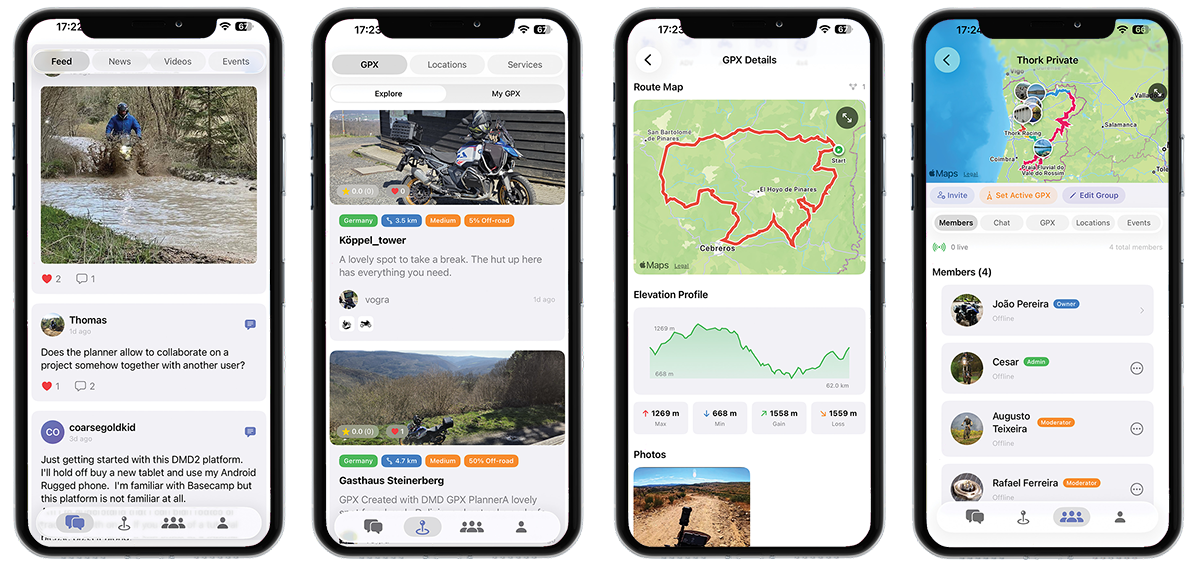
DMD HUB Screenshots

The app integrates with DMD2 navigation devices, allowing you to send destinations directly from the HUB to your DMD2 for turn-by-turn navigation on the road, to manage your riding groups, to load GPX files in the DMD2 app map, and much, much more!

Frequently Asked Questions

You can create a free account directly in the app by tapping "Sign Up" on the login screen, or register on the DMD HUB website. Your account works across both the app and the website.

No! DMD HUB is free to use for everyone. The community features (social feed, GPX sharing, riding groups, locations, events) work without any DMD2 device. The DMD2 integration features (sending navigation destinations, loading GPX files to DMD2) require a DMD2 device.

Navigate to your Riding Group, then go to the GPX/Files section. Tap the "+" button to upload a file from your device or link one from your GPX Manager library. Group members with the appropriate permissions can view, download, and set files as the group's active GPX.

The Route Planner is available on iPad. Navigate to the Planner tab in the main menu. You can create new routes, edit existing ones from your GPX Manager, or edit your riding group's active GPX. Choose from road, scenic, and off-road routing profiles with customizable adventure settings.

Find any location in Community Locations or your Location Manager, then tap the "Navigate" button. You can also share a location from Apple Maps or Google Maps to the DMD HUB app and choose "Navigate to DMD2". The destination will appear on your DMD2 device next time it connects.

Make sure notifications are enabled in your device Settings > DMD HUB > Notifications. In the app, go to Account > Notifications to configure which content types trigger notifications. If notifications still don't work, try signing out and signing back in.

The app uses secure token-based authentication that automatically refreshes. If you're frequently logged out, ensure you have a stable internet connection. If the issue persists, try signing out completely, force-closing the app, and signing back in.

Privacy & Data

Your privacy matters to us. DMD HUB collects only the data necessary to provide its features. Location data is used for riding group live tracking (only when you're in a group) and for discovering nearby community content. You can control your profile visibility and notification preferences in the app settings.

For full details, please review our Privacy Policy.

Need Help?

Can't find the answer you're looking for? Our support team is here to help.

Open a Support Ticket Email Support

We typically respond within 24-48 hours.

App Information

Top